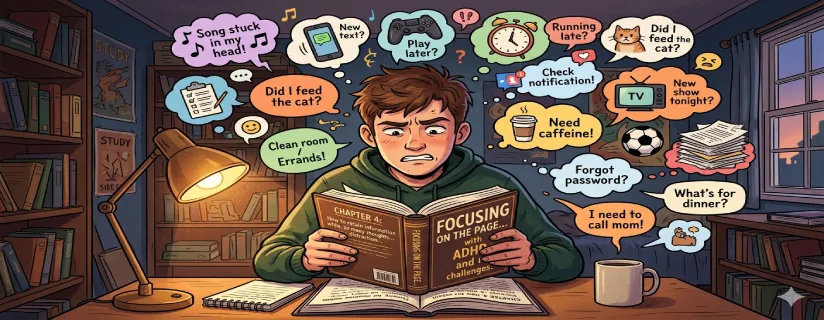
Reading with ADHD can feel strangely inconsistent. Some days you can fly through pages, and other days you reread the same paragraph three times and still lose the thread. That is not a character flaw. It is often a mismatch between how reading is usually taught (sit still, focus longer, push through) and how ADHD brains regulate attention, effort, and working memory.
This guide is built for real life: phone screens, noisy environments, low-energy days, and the constant pull to switch tasks. You will learn a practical system for getting started, staying on the page, understanding what you read, and retaining enough to use it later.
If you already use AI tools in your workflow, one simple way to reduce “screen fatigue” is to add an audio review pass. For example, you can convert key sections into audio with AI Listen and listen back while walking—often a smoother way to catch clarity gaps than forcing another on-screen reread.
People often describe ADHD reading issues as “can’t focus,” but the experience is more specific than that. The problem is rarely intelligence. It is usually the combination of attention regulation, working memory limits, and friction around starting and restarting.
With ADHD, attention can be highly available when something is interesting or urgent, and almost inaccessible when it feels flat, confusing, or emotionally “cold.” Reading—especially dense or unfamiliar material—does not always provide enough immediate reward signals. So your brain looks for something else that does.
Reading requires you to hold the last sentence in mind while you integrate the next one. When working memory is taxed (stress, fatigue, distractions), you may understand each sentence in isolation but fail to keep a coherent mental model of the paragraph. That is when rereading loops start.
ADHD is also about task initiation. If opening the document, finding your place, and deciding what to do next all require effort, your brain will avoid the whole activity. Even a small interruption can reset you to “zero,” making it feel easier to quit than to restart.
Instead of trying to “focus harder,” use a repeatable workflow. Your goal is not perfect attention. Your goal is forward motion with enough understanding.
Before you read, scan for structure:
Headings and subheadings
Topic sentences (first line of each paragraph)
Lists, bolded terms, and visuals
This gives your brain a map. When attention dips, you have landmarks to come back to.
Choose one goal for the next chunk, not the whole document. Examples:
“Find the main claim in this section.”
“Collect three reasons.”
“Understand this one concept enough to explain it.”
Then read only 1–3 paragraphs (or one screen) at a time.
The review step is where comprehension becomes retention. You can review in several ways:
Summarize the section in one sentence.
Answer 2–3 recall questions.
Switch input mode: listen to a short audio version of the key passage.
Audio is not “cheating.” It is a mode switch. Many ADHD readers find that listening during light movement improves persistence and reduces the urge to tab-switch.
ADHD-friendly reading is often about lowering the cost of staying engaged.
Micro-distractions create constant context switching. Try:
One-tab rule (only the reading tab)
Phone on Do Not Disturb (or out of reach)
Full-screen mode / reader mode
A single allowed “parking lot” note for random thoughts
Tiny formatting changes can dramatically reduce fatigue:
Increase line spacing and font size
Use dark mode if glare is a problem
Prefer short line length (narrower column)
Break long paragraphs into smaller blocks when possible
Your nervous system is part of your reading system:
Read standing up for 5 minutes
Sip water before you start
Use a small fidget that does not pull attention
Add gentle movement during review (walk and listen)
The biggest mistake is stacking too many techniques at once. Pick one technique for one session.
Use short sprints with a clear end:
5–10 minutes reading
1 minute recap
2 minutes break
The target matters as much as the timer. “Read 2 screens” is often better than “read for 10 minutes,” because it gives you closure.
A pointer reduces visual drift:
Finger on paper
Pen under the current line
Cursor or highlight bar on screen
This is especially helpful when you notice you are “looking” at text but not processing it.
If you are stuck, do not just push harder. Change one variable:
Shorten the chunk
Change the goal (scan first, then read)
Change the mode (review in audio)
Highlighting can feel productive but often becomes noise. ADHD readers are especially vulnerable to “highlight everything” because it provides instant feedback without true understanding.
After each section, answer:
What is the main idea?
What is one example or reason?
What would change if this idea were false?
Start with one sentence summary. If you can, expand to three sentences:
Claim
Evidence
Implication
Your note goal is not a transcript. Capture:
The heading
Up to 3 bullets
One “so what” line
Rereading loops happen when the brain cannot build a stable model of what the text is saying.
Common causes:
Vocabulary: one unknown term breaks the chain
Syntax: long sentences without clear structure
Low context: you missed the setup in a previous paragraph
Fatigue: you are reading at a time your brain cannot sustain
Instead of rereading the same lines:
Restate your goal (“I only need the main claim.”)
Preview the next subheading (find the destination)
Re-enter and read only the first sentence of each paragraph
After a visual pass, try a short audio review. Converting a key paragraph into audio and listening back can make the meaning “click” because it changes pacing and reduces visual overload. Tools like AI Listen fit here as a quick convert → listen → catch gaps step.

Tools should reduce friction, not add settings and complexity.
Low-friction capture (paste text or share to the app)
Simple playback controls
Fast switching between reading and review
Minimal clutter that does not pull you into “tinkering”
Many people do best with a mixed approach: read visually first to grasp the structure, then run a quick audio review for reinforcement—e.g., convert the key section with AI Listen and listen back while walking—and finish with a one- or two-sentence summary to support retention.
Starting with the hardest text of the day
Reading without a question in mind
Confusing time spent with understanding
Restarting without a “bookmark note”
Using highlighting as a substitute for recall
Learning how to read with ADHD is less about willpower and more about building a repeatable system. Preview for structure, read in short chunks with a clear goal, and review in a way that fits your brain—especially on days when screen reading feels heavy.
If you want a practical way to make the review pass easier, try converting key sections into audio and listening back during a walk. AI Listen is designed for that kind of convert → listen → review step, helping you catch pacing and clarity issues without forcing another full on-screen reread.