Speech recognition has moved far beyond novelty. For many people, it is now part of daily life—used to send messages, dictate notes, control devices, search the web, draft documents, and reduce the amount of typing required during work or study.
That growing adoption explains why people search for speech recognition benefits and limitations. They are not only asking what the technology does. They want to know where it genuinely helps, where it still falls short, and how it fits into practical workflows.
Speech recognition is the process of converting spoken language into written text or executable commands. In consumer use, it often appears as voice typing, dictation, transcription, voice search, or spoken device control.
Its value is easy to understand. Speaking is often faster than typing, more natural in mobile situations, and more accessible for users who struggle with keyboards or long reading-and-writing sessions. In the right setting, speech recognition can reduce friction and speed up communication.
But like most language technologies, it works best under certain conditions and less well under others.
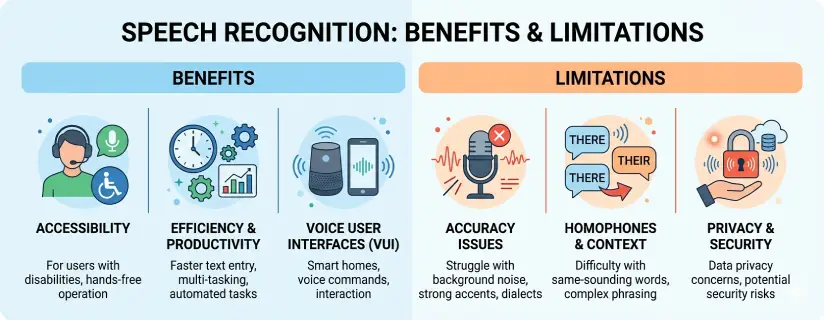
The strongest use cases for speech recognition usually fall into a few broad categories.
For many users, speaking is faster than typing. That makes speech recognition useful for drafting emails, taking notes, outlining content, and getting ideas down before they disappear.
Speech recognition plays an important role in assistive technology. It can help users with mobility limitations, repetitive strain, dyslexia, visual fatigue, or other conditions that make typing harder or more tiring.
Voice input is especially useful when typing is inconvenient, such as while cooking, walking, commuting, or handling other tasks. It can also support safer interaction in settings where looking down at a screen is not ideal.
Some people think more clearly out loud than on a keyboard. For them, dictation helps generate a first draft faster and with less interruption.
Students, professionals, creators, and multilingual users all benefit from quicker input, easier capture of spoken ideas, and more flexible interaction with digital tools.
Adoption has expanded because the technology is no longer limited to a narrow group of users. It is built into phones, browsers, operating systems, apps, and smart assistants.
People now use speech recognition for:
drafting documents,
sending messages,
searching the web,
controlling smart devices,
navigating interfaces,
creating content,
recording quick reminders,
reducing screen and keyboard fatigue.
The convenience is real. But convenience alone does not remove the tradeoffs.
A balanced view of speech recognition benefits and limitations has to account for where the technology still struggles.
Speech recognition often performs well in quiet spaces, but background noise can quickly reduce quality. Conversations nearby, traffic, fans, poor acoustics, or movement can all introduce errors.
Modern systems have improved a lot, but performance can still vary across accents, dialects, pacing, and speaking style. Some users may need to adjust their speech more than others to get consistent results.
Technical, medical, scientific, legal, or industry-specific terms may not be recognized reliably without additional context or training.
Not every setting is suitable for speaking sensitive information aloud. In public, shared offices, classrooms, or meetings, voice input may feel impractical even when it works technically.
People often speak in fragments, repeat themselves, change direction mid-sentence, or think aloud. That makes raw dictation useful for capture, but not always ready for final use.
Microphone quality, connection stability, device age, and software optimization all influence how well speech recognition performs.
This is the key point many summary articles miss. Speech recognition is not simply good or bad. It is highly context-dependent.
It works especially well when:
the environment is quiet,
the speaker is clear,
the task is short or structured,
the vocabulary is relatively common,
the microphone is decent,
the output can be reviewed afterward.
It works less well when:
the setting is noisy,
the content is highly specialized,
privacy matters,
multiple people are speaking,
the user needs polished output immediately.
That is why many of the best real-world workflows do not rely on speech recognition alone.
Students can use dictation for brainstorming, note capture, and rough drafting. It can also support learners who think more effectively through speech than typing.
Busy professionals often use voice input to capture ideas, respond quickly, or create rough drafts before editing later.
Speech recognition remains especially valuable for users who need alternatives to traditional keyboard-heavy interaction.
Writers, marketers, and creators often use dictation to move from idea to draft more quickly, especially when planning scripts, outlines, and captions.
One practical limitation of speech recognition is that spoken output still needs review. Dictation helps users create text faster, but they often need another layer of support to read it back, catch errors, or process related documents more efficiently.
That is where complementary tools matter.
For example, AI Listen Audio Reader fits naturally into workflows where speech, text, and review overlap. It supports text-to-speech across PDFs, Word files, TXT, EPUB, webpages, and image scans, which helps users listen back to content, reduce visual fatigue, and work across multiple formats rather than staying locked into one input mode.
One of the easiest ways to catch awkward phrasing or recognition errors is to hear the content out loud. Audio review can make editing more efficient than silent rereading alone.
Many users who rely on speech workflows also deal with long-form material in PDF, Word, web, or scanned formats. AI Listen Audio Reader helps turn that content into playable audio.
Speech recognition solves input problems. Text-to-speech solves output and review problems. Together, they create a more flexible accessibility workflow.
With 40+ languages, OCR, synchronized highlighting, AI summaries, and speed reading features, AI Listen Audio Reader helps users move more smoothly between speaking, reading, listening, and reviewing.
If users understand the limitations, they can often improve performance significantly.
You do not need robotic diction, but steady pacing and complete words usually help.
A quieter environment and a better microphone can improve results quickly.
Shorter phrases are often easier for the system to recognize accurately than long, wandering spoken paragraphs.
Speech recognition is often best treated as a drafting tool rather than a final output tool.
Listening back can reveal issues that are easy to miss on screen.
The real story of speech recognition benefits and limitations is not that the technology is flawed or overhyped. It is that it is genuinely useful when matched to the right context.
Speech recognition can improve speed, accessibility, and hands-free interaction in meaningful ways. At the same time, accuracy, privacy, specialized language, and review needs still matter. For users who want a more complete workflow, combining dictation with a tool like AI Listen Audio Reader can make both creation and review far more practical.

![GoAnimate (Vyond) Text to Speech: Complete Guide + Best Alternatives [2026]](https://v.aivoicelab.com/b1265344voduse1318177724/4c48016b5001834806033798579/qJrAff3z3FIA.webp)